In release 8.2.07 documentation there is a change, relative path file references had been unsupported, but then doc states that it is supported. An example:
-INCLUDE ./chart1.fex
This is a repository feature, not supported in the reporting server. The included fex is in the same repository folder as the fex with the include. The documentation has been improved to describe the difference between file references within the repository versus file references on the repository.
Developing Reporting Applications, page 402
The following code can be used to write out variables and values to a file. It could be useful for debugging. For example, use it in a procedure that populates valules in a dropdown when the values don't seem to be appearing in the dropdown. The file gets written out to the foccache application directory with the name of the fex that created it and date time stamp in the name of the created file.
-DEFAULTH variables and values are not included.
-SET &Filename = TOKEN(&FOCFEXNAME,'.',1);

-SET &Filedttm = TOKEN(&Filename,'/',-1) || EDIT(&DATEHYYMDS,'_9999$99$99_$99$99$99.fex') ;

-? & SAVE foccache/&Filedttm.EVAL
Using SQL CREATE, MODIFY FILE, -REPEAT, ACROSS, several date data types, and report styling, all working together, a nice calendar for the current year can be produced.
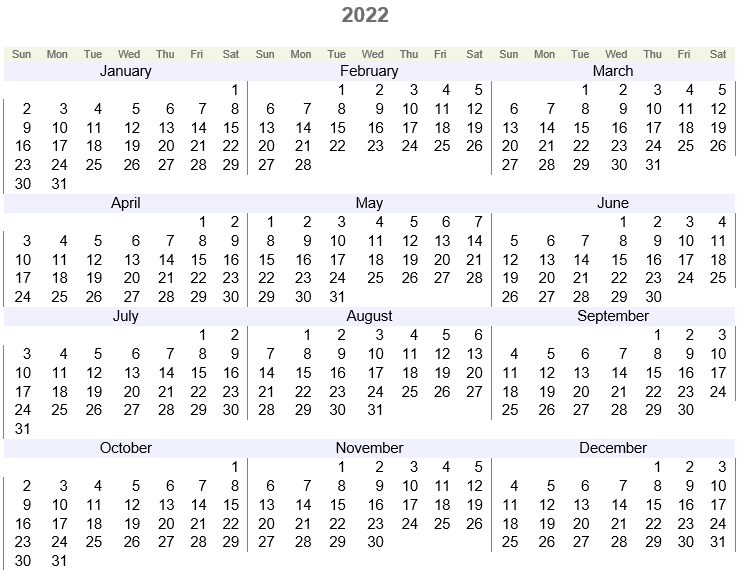
Here is the code:
-SET &Date = &DATEYY | '0101';

-SET &End  = &DATEYY | '1231';

-SET &i    = 1;


 SQL CREATE TABLE calendar (KEY INTEGER ,DATE_YYMD DATE);

 END


 MODIFY FILE calendar

 MATCH KEY

 ON MATCH REJECT

 ON NOMATCH INCLUDE

 DATA

-REPEAT ENDREPEAT WHILE &Date LE &End;

 &i,'&Date',$

-SET &i = &i + 1;

-SET &Date = AYMD(&Date, 1, 'I8YYMD');

-ENDREPEAT

 END


 SET NODATA=' ',PAGE=NOLEAD,ACROSSLINE=SKIP,LINES=899,HTMLCSS=ON


 DEFINE FILE calendar

 DATE_W/w            = DATE_YYMD ;

 DATE_wt/wt          = DATE_YYMD ;

 DATE_D/D            = DATE_YYMD ;

 DATE_Mtr/Mtr        = DATE_YYMD ;

 DATE_Q/Q            = DATE_YYMD ;

 DATE_YYQ/YYQ        = DATE_YYMD ;

 DATE_W2/I1          = IF DATE_W EQ 7 THEN 0 ELSE DATE_W ;

 DATE_A8YYMD/A8YYMD  = DATE_YYMD ;

 DATE_A4/A4          = EDIT(DATE_A8YYMD,'$$$$9999') ;

 Week_of_Month/I2    = IF LAST DATE_Mtr NE DATE_Mtr THEN 1 ELSE IF DATE_W EQ 7 THEN Week_of_Month + 1 ELSE Week_of_Month ;

 Month_of_Quarter/I2 = IF LAST DATE_Q NE DATE_Q THEN 1 ELSE IF LAST DATE_Mtr EQ DATE_Mtr THEN Month_of_Quarter ELSE Month_of_Quarter + 1 ;

 END


 TABLE FILE calendar

 "&DATEYY"

     SUM DATE_D               AS ''

 COMPUTE M3/Mtr = DATE_Mtr+2; NOPRINT

 COMPUTE M2/Mtr = DATE_Mtr+1; NOPRINT

         DATE_YYMD            NOPRINT

         DATE_Mtr             NOPRINT

         DATE_W               NOPRINT

      BY DATE_YYQ             NOPRINT

      BY Week_of_Month        NOPRINT

  ACROSS Month_of_Quarter     NOPRINT

  ACROSS DATE_W2              NOPRINT

  ACROSS DATE_wt              AS ''

 ON DATE_YYQ SUBHEAD

 "<DATE_Mtr<M2<M3"

 ON TABLE SET STYLE *

 type=report, font=arial, size=11,$

 type=heading, size=16, color=rgb(110 110 110), justify=center, style=bold,$

 type=acrossvalue, size=8, color=rgb(110 110 110), backcolor=rgb(245 245 230),$

 type=subhead, backcolor=rgb(240 240 255), justify=center,headalign=body,$

 type=subhead, item=1, colspan=7,$

 type=subhead, item=2, colspan=7,$

 type=subhead, item=3, colspan=7,$

 type=data, acrosscolumn=date_d, border-left=light, border-color=gray, when=DATE_W eq 7,$

 type=data, acrosscolumn=date_d, border-RIGHT=light, border-color=gray, when=DATE_W eq 6,$

 ENDSTYLE

 END
As early as version WF 9.0.0, trigonometric functions have been added to the function library. Additionally, functions for converting between degrees and radians have been added and a function for returning the value of 𝜋.
PI Return the constant piSIN Return the sine of an angle in radiansCOS Return the cosine of an angle in radiansTAN Return the tangent of an angle in radiansCOT Return the cotangent of an angle in radiansACOS Return an angle in radians given its cosineASIN Return an angle in radians given its sineATAN Return an angle in radians given its tangentATAN2 Return an angle in radians given thecoordinates of its tangentDEGREES Convert radians to degreesRADIANS Convert degrees to radians
There are a number of date and time system variables. In general any system variable following this pattern:
    &DATEfmt
      or

    &DATXfmt
where fmt is any date time format that could appear as a field format:
COMPUTE SALESDATE/fmt
as documented in Describing Data with WebFOCUS Language Date Formats and Date-Time Formats. In some cases a particular output can be achieved with two variables used together.
  &DATEMt               = Jun
  &DATEYY &DATEMt       = 2022 Jun
  &DATEYY &DATEMtr      = 2022 June
  &DATEYYBMtBD          = 2022 Jun 23
  &DATEYYBMtBD          = Jun 23 2022
  &DATEtrMDYY           = June 23, 2022
  &DATEWtMtrDYY         = THU, June 23 2022
  &DATEHMDYY            = 06/23/2022
  &DATEM                = 06
  &DATED                = 23
  &DATEQ                = Q2
  &DATEYYQ              = 2022 Q2
  &DATEQYY              = Q2 2022
  &DATEW                = 4
  &DATEWt               = Thu
  &DATEWR               = THURSDAY
  &DATEWtr              = Thursday
  &DATEYY               = 2022
  &DATEH6               = 202206
  &DATEYYMD             = 2022/06/23
  &DATEHHA              = 06PM
  &DATEHHIA             = 06:50PM
  &DATEHHIb             = 06:50 pm
  &DATEHHISb            = 06:50:43 pm
  &DATEHHISB            = 06:50:43 PM
  &DATEHHa              = 06pm
  &DATEHHB              = 06 PM
  &DATEHHb              = 06 pm
  &DATEHIS              = 50:43
  &DATEHHIS             = 18:50:43
  &DATE                 = 06/23/22
  &DATEHYYMDI           = 2022/06/23 18:50
  &DATEHMDYYS           = 06/23/2022 18:50:43
  &DATEHYYMDIB          = 2022/06/23  6:50 PM
  &DATEHYYMDIa          = 2022/06/23  6:50pm
  &DATEHYYMDIA          = 2022/06/23  6:50PM
  &DATEHYYMDSA          = 2022/06/23  6:50:43PM
  &DATEHYYMDSB          = 2022/06/23  6:50:43 PM
  &DATEHYYMDSb          = 2022/06/23  6:50:43 pm
  &DATEHMDYYS           = 06/23/2022 18:50:43
  &DATXtrMDYY&DATEHHIA  = June 23, 2022 06:50PM
  &DATXtrMDYY&DATEHHIa  = June 23, 2022 06:50pm
  &DATXtrMDYY&DATEHHIB  = June 23, 2022 06:50 PM
  &DATXtrMDYY&DATEHHIb  = June 23, 2022 06:50 pm
  &DATXtrMDYY&DATEHHISA = June 23, 2022 06:50:43PM
  &DATXtrMDYY&DATEHHISa = June 23, 2022 06:50:43pm
  &DATXtrMDYY&DATEHHISB = June 23, 2022 06:50:43 PM
  &DATXtrMDYY&DATEHHISb = June 23, 2022 06:50:43 pm
With some newer field formats, fields can be displayed in millions or billions and many other formats. This example from the Describing Data With WebFOCUS® Language, Page 127 shows how.
 DEFINE FILE GGSALES

 NEWDOLL/D12.2 = DOLLARS * 100;

 END

 TABLE FILE GGSALES

 SUM DOLLARS

     NEWDOLL/D12.2nM AS 'Millions'

     NEWDOLL/D12.2nG AS 'Billions'

  BY CATEGORY

 ON TABLE SET PAGE NOLEAD

 ON TABLE SET STYLE *

 GRID=OFF,$

 ENDSTYLE

 END
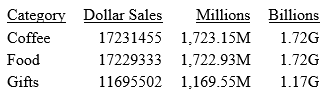
The full range of formats is described in the following table:
         WebFOCUS
         Format                                      English Name
  Prefix Code   Size      Example                    American    / British
  yotta  nY     10**24    1000000000000000000000000  septillion  / quadrillion
  zetta  nZ     10**21    1000000000000000000000     sextillion  / trilliard
  exa    nE     10**18    1000000000000000000        quintillion / trillion
  peta   nP     10**15    1000000000000000           quadrillion / billiard
  tera   nT     10**12    1000000000000              trillion    / billion
  giga   nG     10**9     1000000000                 billion     / milliard
  mega   nM     10**6     1000000                    million
  kilo   nK     10**3     1000                       thousand
  milli  nm     10**(-3)  0.001                      thousandth
  micro  nu     10**(-6)  0.000001                   millionth
  nano   nn     10**(-9)  0.000000001                billionth     / milliardth
  pico   np     10**(-12) 0.000000000001             trillionth    / billionth
  femto  nf     10**(-15) 0.000000000000001          quadrillionth / billiardth
  atto   na     10**(-18) 0.000000000000000001       quintillionth / trillionth
  zepto  nz     10**(-21) 0.000000000000000001       sextillionth  / trilliardth
  yocto  ny     10**(-24) 0.000000000000000000000001 septillionth  / quadrillionth
The following SET statements can be used in a fex show the SQL statement(s) created to pull data from a relational database.
 SET XRETRIEVAL = OFF
 SET MESSAGE    = OFF
 SET TRACEOFF   = ALL
 SET TRACEON    = STMTRACE//CLIENT
 SET TRACEON    = SQLAGGR//CLIENT
 SET TRACESTAMP = OFF
 SET TRACEWRAP  = 100
 SET TRACEUSER  = ON
The SET XRETIRIEVAL=OFF will suppress data retrieval from the database.
The SET MESSAGE=OFF shows the sql trace code without having to click on the Blue "No Data" message.
Use this page https://webfoc.us for ready access to WF documentation links, Search links, video links and other resoures for the WF developer.